希望するご予約を
お選びください

×閉じる

Medical guide

Medical guide

Quick guide

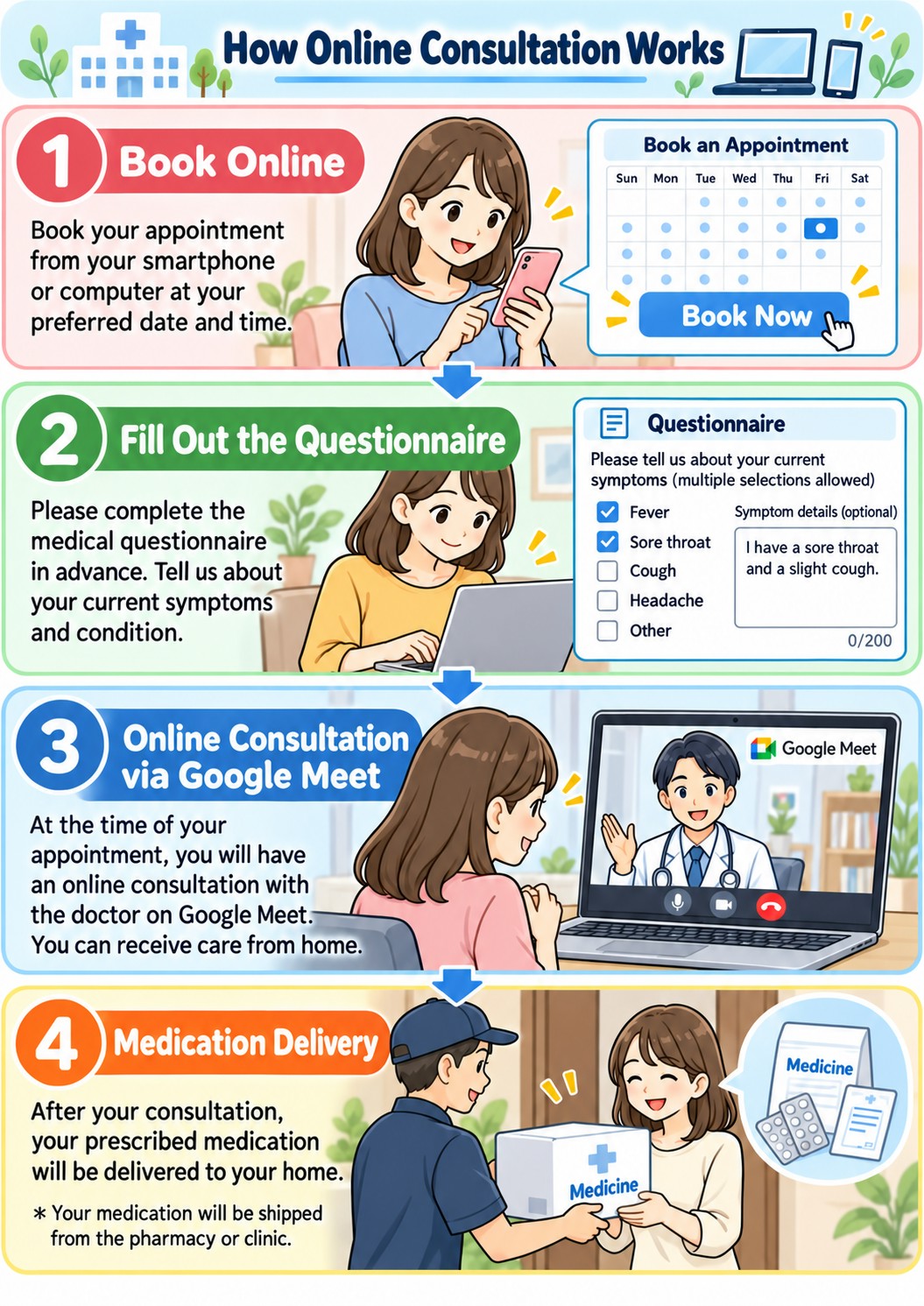
Treatment flow

Booking

Select an available time slot.

Medical Questionnaire

Complete the questionnaire before your consultation. It is required.

Online Consultation

Join the video consultation via Google Meet using the link sent to your email. For instructions on how to use Google Meet, click [here].

Payment & Delivery

Pay by credit card. Medication will be delivered by our clinic or a partner pharmacy.

Payment Methods

  • Credit card

Requirements

  • Smart phone or PC
  • Credit card

Appointment

How to use Google Meet

We use Google Meet, a free video calling service, for online consultations. You can join from your smartphone, tablet, or computer.

How to join:

  1. Open the Google Meet link provided by our clinic at your scheduled appointment time.
  2. Allow access to your camera and microphone.
  3. Enter your name and request to join if prompted.
  4. Once admitted, your online consultation will begin.

Good to know:

  • You can join without a Google account, subject to meeting access settings.
  • No additional software is required on most computers. Mobile devices can use the Google Meet app or a supported browser.
  • Please use a stable internet connection and find a quiet, private place for your consultation.